~/projects/liquidation-tracker/README.md
Liquidation Tracker
A full-stack financial operations platform for managing invoices, cash advances, liquidations, and recurring bills — featuring multi-step approval workflows, automated CRF PDF generation, and a PWA-enabled approval dashboard for mobile access.
- roles
- 8
- approval pipeline steps
- 6
- permissions
- DB-driven
- n8n ops briefing
- Daily
cat architecture.flow
System Architecture
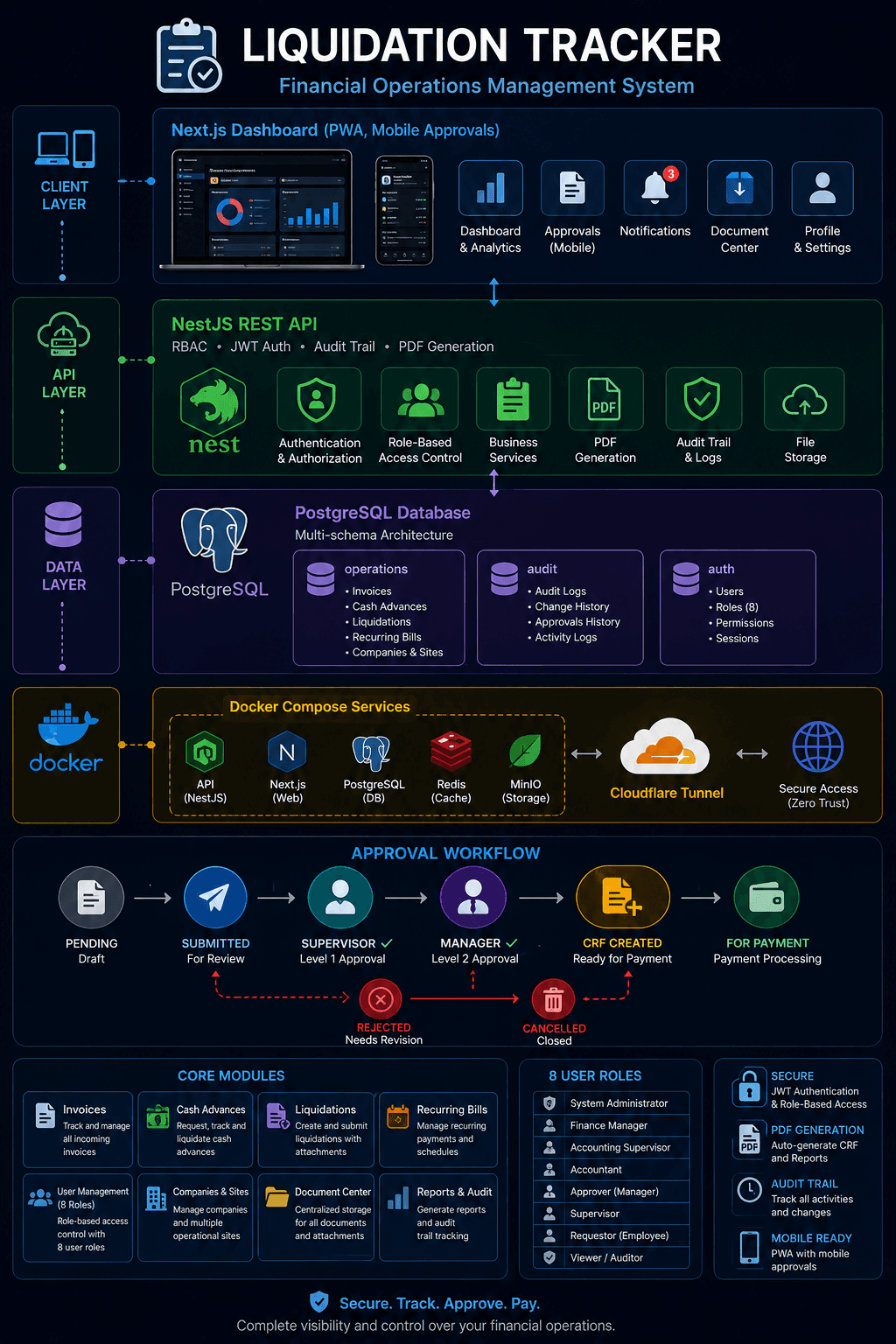
liquidation-tracker-architecture.png
cat problem.md
Business Problem
Finance teams managing multiple plant operations often struggle with a fragmented expense management process. Invoices arrive through different channels, cash advances are tracked manually, and liquidation reports require tedious reconciliation — all handled through spreadsheets, email threads, and paper-based forms.
The Check Request Form (CRF) process is particularly labour-intensive. Each recurring bill requires someone to manually fill out a PDF template, verify vendor details, confirm billing periods, route the form through multiple levels of approval, and track payment status — a process prone to delays, lost documents, and inconsistent formatting.
Without a centralized system, there is no visibility into what bills are pending approval, which ones are overdue, or who is responsible for each step. Approval bottlenecks directly impact payment timelines and vendor relationships.
cat solution.md
Solution
I designed and built a full-stack financial operations platform that centralizes invoice management, cash advance requests, liquidation reporting, and recurring bill processing into a single web application with role-based access control and automated approval workflows.
The system handles the complete lifecycle of financial documents — from initial submission through multi-level approval, CRF generation, payment tracking, and audit logging. Each action is recorded with timestamps and user attribution, creating a full audit trail for compliance.
For recurring bills, the platform implements a structured five-step approval pipeline: an employee submits the bill, a supervisor reviews and approves, a manager provides secondary approval, a CRF Creator generates the official Check Request Form PDF, and the bill moves to payment processing. Rejection at any stage returns the bill with remarks for correction.
The CRF PDF is auto-generated from a standardized template, pulling vendor details, invoice numbers, billing periods, plant codes, and amounts directly from the database — eliminating manual form filling and ensuring consistent formatting across all requests.
A dedicated approval dashboard provides supervisors and managers with real-time visibility into pending approvals, overdue items, and approval statistics. The dashboard is built as a Progressive Web App (PWA), allowing approvers to access it from their mobile devices and install it directly on their home screen without requiring an app store.
ls ./components
Architecture Decisions
Next.js Dashboard
Provides a server-rendered, responsive frontend with role-based navigation, real-time status updates, and mobile-optimized layouts for field and office use.
NestJS REST API
A modular backend with strict RBAC enforcement, JWT authentication, audit logging, and service-layer business logic for each financial module.
PostgreSQL
Multi-schema database separating operations, audit, and auth data. Supports complex approval state machines, financial calculations, and reporting queries.
PDF Generation
Automated CRF PDF creation from a standardized AcroForm template, pulling live data to produce consistently formatted, print-ready documents for payment processing.
PWA & Mobile Approvals
Service worker caching, manifest configuration, and installable prompts allow approvers to act from mobile devices without a native app, accelerating the approval cycle.
Docker Compose
Containerized deployment with separate API, dashboard, and database services. Simplifies upgrades, backups, and environment consistency across development and production.
./run --trace
System Workflow
The platform processes every financial document through a structured approval pipeline, ensuring proper authorization before payment while maintaining a complete audit trail.
- 01
Bill Submission
An employee creates a recurring bill entry with vendor details, invoice number, billing period, amount, plant code, and supporting attachments.
- 02
Submission to Workflow
The submitter sends the bill into the approval pipeline. The system records the submission timestamp and locks the bill from further editing.
- 03
Supervisor Approval
A supervisor reviews the bill for accuracy and compliance. They can approve to advance it to the next level, or reject with remarks.
- 04
Manager Approval
A manager (different from the supervisor) provides secondary authorization, ensuring dual-control over financial commitments.
- 05
CRF Generation
A CRF Creator generates the official Check Request Form PDF from a standardized template, pulling all details directly from the database.
- 06
Payment Processing
The completed CRF moves to FOR_PAYMENT status. Finance marks bills as paid once processing is complete, closing the workflow.
cat rbac.md
Role-Based Access Control
Eight distinct roles ensure each user sees only what they need — from field employees submitting receipts to finance administrators managing the full lifecycle. Permissions are database-driven rather than hardcoded: a dedicated Roles & Permissions admin page lets a Super Admin grant or revoke any of the platform's permission codes per role, module by module, with zero code deploys — every mutating endpoint fails closed on an unrecognized permission by default.
SUPER_ADMIN
Full system access
ADMIN
Operational management
FINANCE
Payment processing
MANAGER
Level 2 approvals
SUPERVISOR
Level 1 approvals
CRF_CREATOR
CRF PDF generation
OUTSOURCE_ADMIN
Outsource oversight
OUTSOURCE_USER
Submit own bills
cat analytics.md
Analytics & Reporting
A Recurring Bills Cycle Time Dashboard tracks every bill from creation through payment across five real pipeline stages — submission, supervisor approval, manager approval, CRF handoff, transmittal email, and accounting receipt — surfacing average and median days-to-pay, a per-stage bottleneck breakdown, and a by-category comparison, all scoped to a single billing period so a finished month's numbers never blend with an active one.
A one-click PDF export renders the same dashboard as a management-committee-ready report: an executive summary, KPI tiles, stage and category charts, and a data-derived recommendations list that names specific overdue bills and bottleneck stages rather than generic advice — branded with the company logo and generated on demand via a headless Chromium rendering service.
crontab -l
Automated Operations
Supervisors are notified automatically the moment a liquidation is submitted for approval — no more polling a dashboard to find out something is waiting. The mailer runs asynchronously so a delivery failure can never block the underlying submission, with every attempt written to the audit log either way.
A daily operations briefing runs entirely inside a self-hosted n8n instance on a scheduled trigger: it pulls the last 24 hours of engineering activity and live pending counts (liquidations awaiting processing, transmittals awaiting receipt, bills still in flight) straight from production, emails a summary, renders it as a PDF, and posts that PDF to a Telegram group — with n8n reaching the server through a dedicated, forced-command SSH key that can run exactly two whitelisted read-only operations and nothing else.
./deploy.sh --help
Deployment
Production runs as blue/green slots behind a reverse proxy, and every release is deployed by version tag through a single deploy script rather than by restarting services in place.
cat package.json | jq .stack
Technology Stack
echo $EXIT_STATUS
Project Outcome
outcome.log
Invoices, cash advances, liquidations and recurring bills now move through one audited system instead of spreadsheets, email threads and paper forms, with every approval attributed and timestamped.
Management gets cycle-time visibility down to the individual bottleneck stage, and administrators can change who may do what without a code deploy.