~/projects/expense-automation/README.md
AI Expense Automation Platform
A self-hosted AI-powered document processing platform that automates invoice and receipt intake, OCR, AI extraction, validation, PostgreSQL storage, and AppSheet synchronization.
cat architecture.flow
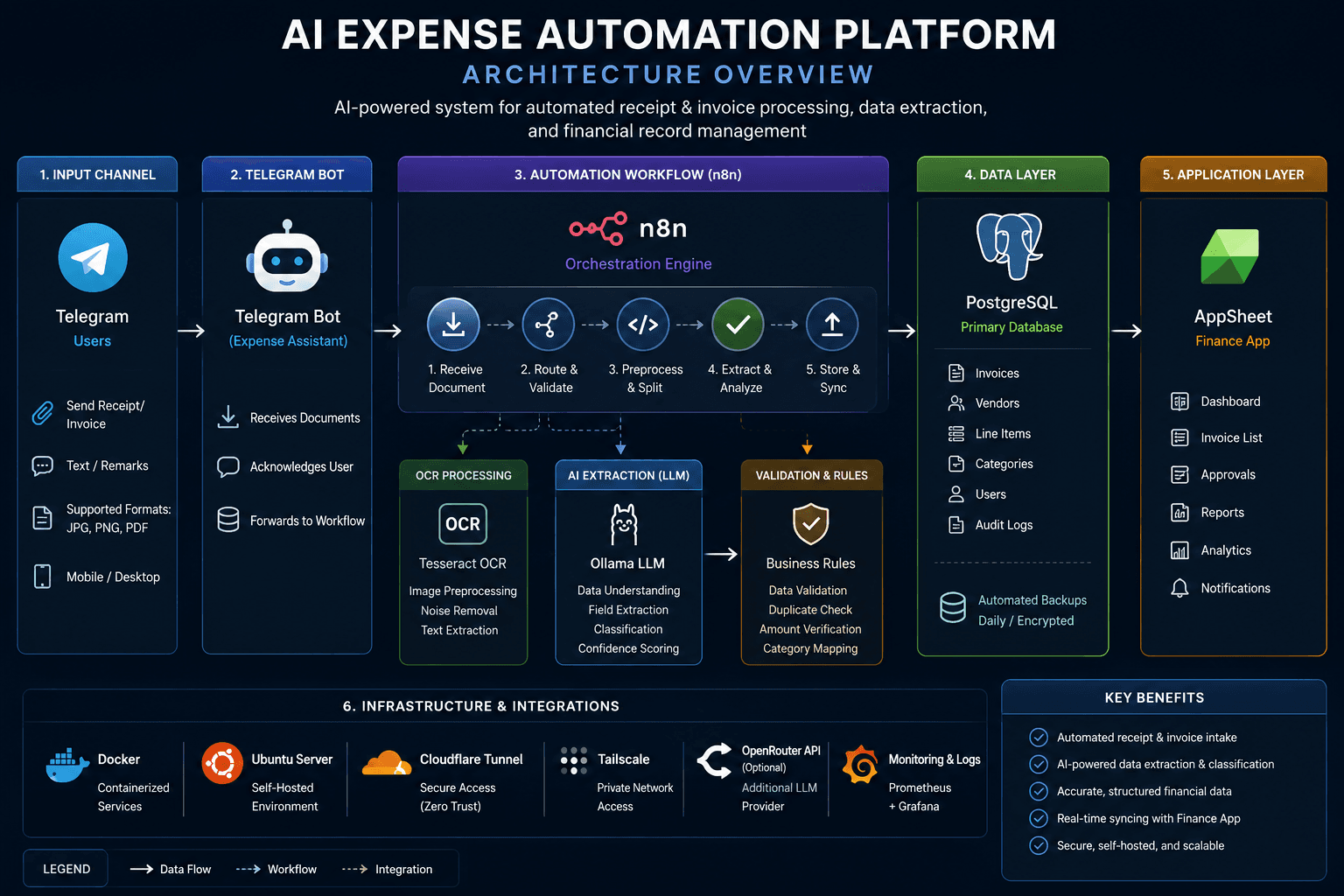
System Architecture
expense-automation-architecture.png
cat problem.md
Business Problem
Finance teams often receive invoices and receipts through multiple channels, requiring personnel to manually review each document, extract key information, verify its accuracy, and encode the data into internal systems. This repetitive process consumes valuable time and increases the likelihood of human error.
As document volumes grow, manual processing becomes increasingly difficult to scale. Inconsistent document formats, handwritten receipts, and varying vendor layouts further complicate extraction and validation, creating delays in approval and reimbursement workflows.
The objective of this project was to design a secure, self-hosted automation platform capable of receiving documents, extracting structured information using OCR and AI, validating the results, storing records in a centralized database, and synchronizing approved data with business applications—while minimizing manual intervention.
cat solution.md
Solution
I designed and implemented a production-ready, self-hosted AI automation platform that streamlines the entire expense submission and approval process. Rather than relying on multiple disconnected applications, the solution integrates messaging, workflow automation, OCR, artificial intelligence, database storage, and reporting into a single automated pipeline.
Expense documents are submitted through a Telegram Bot, which serves as the primary user interface for remote employees. Every upload triggers an n8n workflow responsible for orchestrating the complete processing lifecycle, including document validation, OCR extraction, AI processing, business rule validation, database updates, and application integration.
Document images and PDFs are processed by a custom OCR microservice built with FastAPI, Tesseract OCR, Poppler, and ImageMagick. The service performs image enhancement, PDF conversion, and optical character recognition before forwarding structured text to the AI layer for intelligent interpretation.
Artificial intelligence is provided through Ollama running locally for privacy-sensitive workloads and OpenRouter for cloud-hosted large language models when additional reasoning capabilities are required. The AI engine extracts business entities such as vendor information, invoice numbers, billing periods, invoice amounts, account codes, and document categories while handling inconsistent invoice formats from multiple suppliers.
Processed records are stored in PostgreSQL, creating a centralized and searchable repository of expense transactions. The workflow automatically synchronizes validated data with AppSheet, providing finance personnel with a familiar interface for review, approval, reporting, and audit tracking.
The entire platform is containerized using Docker and deployed on an Ubuntu Server. Cloudflare Tunnel provides secure HTTPS access without exposing internal services directly to the public internet, while Tailscale enables secure administrative access from any location using VS Code Remote SSH.
ls ./components
Architecture Decisions
Telegram
Provides a familiar mobile-first interface allowing employees to submit expense documents from anywhere without requiring VPN access or installing additional enterprise software.
n8n
Acts as the orchestration engine responsible for coordinating OCR, AI processing, database operations, notifications, and third-party integrations through reusable workflows.
FastAPI OCR Service
Provides a dedicated OCR microservice using Tesseract, Poppler and ImageMagick for high-quality document preprocessing and text extraction.
Ollama + OpenRouter
Combines local AI inference for sensitive workloads with cloud-hosted large language models when additional reasoning and extraction accuracy are required.
PostgreSQL
Stores structured expense records, AI results, audit history, and workflow metadata in a reliable relational database.
Docker
Containerizes every service independently, simplifying deployment, maintenance, upgrades, and portability across environments.
./run --trace
System Workflow
The platform processes every submitted expense document through a fully automated pipeline, eliminating repetitive manual work while ensuring consistent validation, AI-assisted extraction, and centralized storage.
- 01
Employee submits receipt
Employees upload receipts or invoices through the Telegram Bot from any location.
- 02
Telegram triggers n8n
The Telegram Bot sends the document to an n8n workflow that orchestrates the entire process.
- 03
OCR Processing
The OCR microservice converts PDFs, enhances images using ImageMagick, and extracts text using Tesseract.
- 04
AI Document Understanding
Ollama (Qwen/Llama) or OpenRouter analyzes the extracted text, identifies vendors, invoice numbers, billing periods, totals, and other business entities.
- 05
Business Validation
Business rules validate plant codes, vendors, invoice formats, duplicate records, and mandatory fields.
- 06
PostgreSQL Storage
Validated records are written into PostgreSQL, creating a complete audit trail and searchable history.
- 07
Finance Dashboard
AppSheet synchronizes approved records, allowing finance personnel to review, approve, search, and report expenses.
cat package.json | jq .stack
Technology Stack
Automation
Document AI
Data & Platform
echo $EXIT_STATUS
Project Outcome
outcome.log
Expense documents now flow from a phone camera to a validated, searchable database record without manual encoding, with AI extraction handling the inconsistent vendor formats that made the manual process slow and error-prone.
Finance personnel keep working in the AppSheet interface they already know, while every record carries an audit trail back to the original document.